How to master multi-agent software development after a one-year break?
AI
Product development

After a year of parental leave, software development did not look the same anymore: AI no longer just assists the developer, but does an increasingly larger share of the work. Saana built a proof of concept where an orchestrator agent manages sub-agents and a human acts as a gatekeeper. The coding phase shifted to the agents, but the importance of design was emphasised and validation took more time than before.
Text: Saana Hiekkaranta
I returned to work from a year of parental leave and noticed a big change: AI is no longer just assisting the software developer, but is doing an increasingly large part of the development work itself. The use of AI has become commonplace in many companies. In particular, multi-agent software development has risen to popularity this year, whereas a year ago when I went on parental leave, it wasn't talked about nearly as much. In this blog post, I will share an example of how you can start to get to grips with multi-agent software development using a proof of concept.
Here is a summary of three things that surprised me:
The heightened importance of planning and understanding.
Validation takes much more time than before.
Multi-agent software development doesn't necessarily free up as much working time as I initially thought.
What is multi-agent software development?
Let's start by defining some terms that are good to understand:
Agent = an autonomous unit that receives an input, processes it, and returns a response
Subagent = another agent started by an agent, which has been set a clear, narrow objective for its operation
Checkpoint (human-in-the-loop) = a defined review point where a human approves/edits/blocks the agent's action before the next phase
Context window = the AI's working memory, which can hold only a limited amount of data
Orchestration = coordinating and managing multiple agents
Orchestrator = a coordinating agent that breaks down the task into parts and delegates it to subagents
Multi-agent software development could be thought of as a software team where each agent has its own task. For example, one of the agents designs the architecture, another agent codes, and a third agent handles testing and test reporting. So, everything is not done with a single AI agent; instead, the process is divided into small areas of responsibility, and the task is delegated to a specific agent when needed. This way, the work can be divided into smaller parts, and the agents can work simultaneously.
One popular pattern for implementing multi-agent software development is the orchestrator pattern, where a human communicates with the orchestrator agent. The orchestrator agent can call predefined subagents and delegate tasks to them as needed. The orchestrator is like a team leader who divides tasks, collects the results, and then decides what to report to the human. The orchestrator keeps the big picture together and ensures that the right subagent does the right job at the right time.
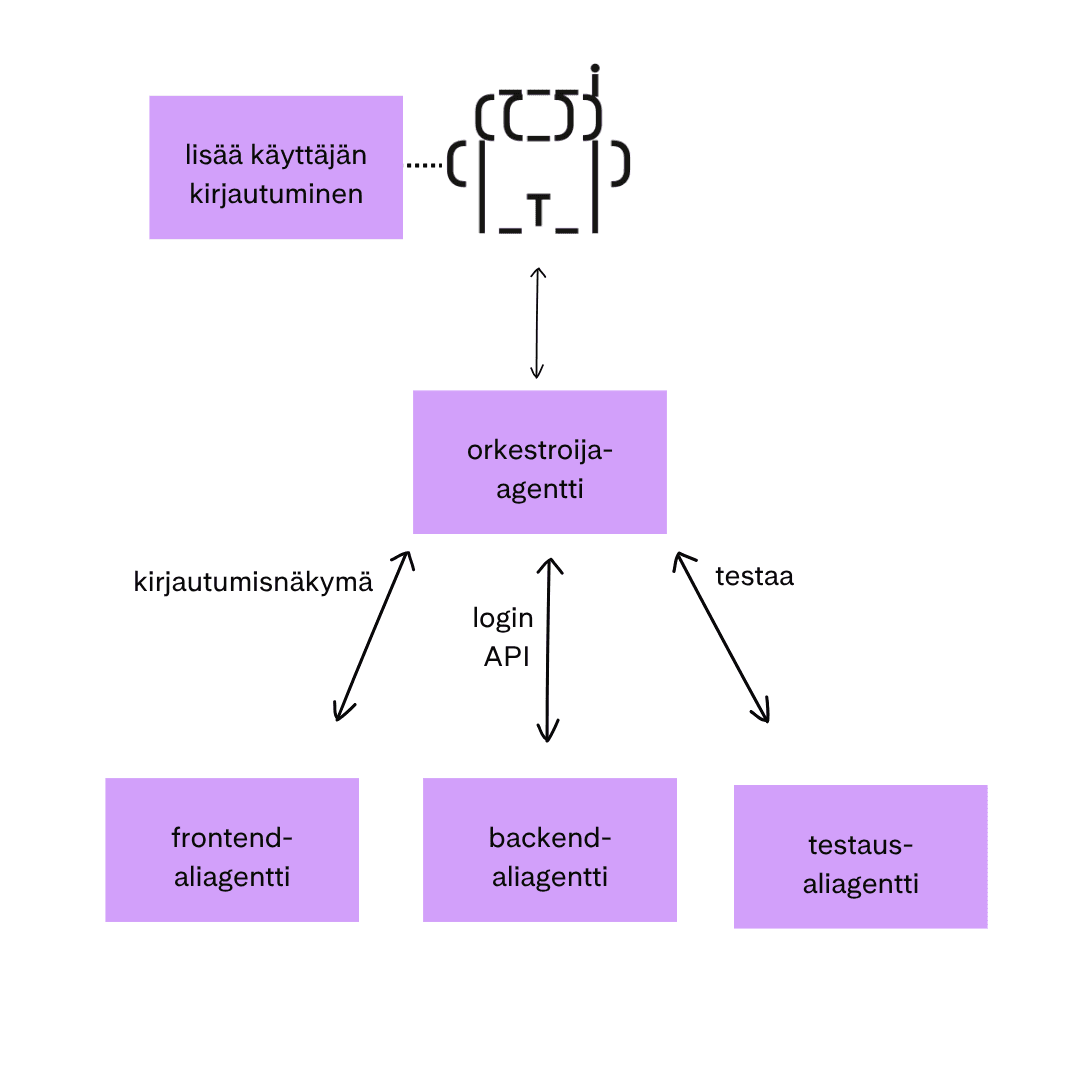
Proof of Concept: Multi-agent software development with Claude Code
The software development life cycle (SDLC) is often described through six phases: requirements specification, architecture, implementation, testing, deployment, and maintenance.
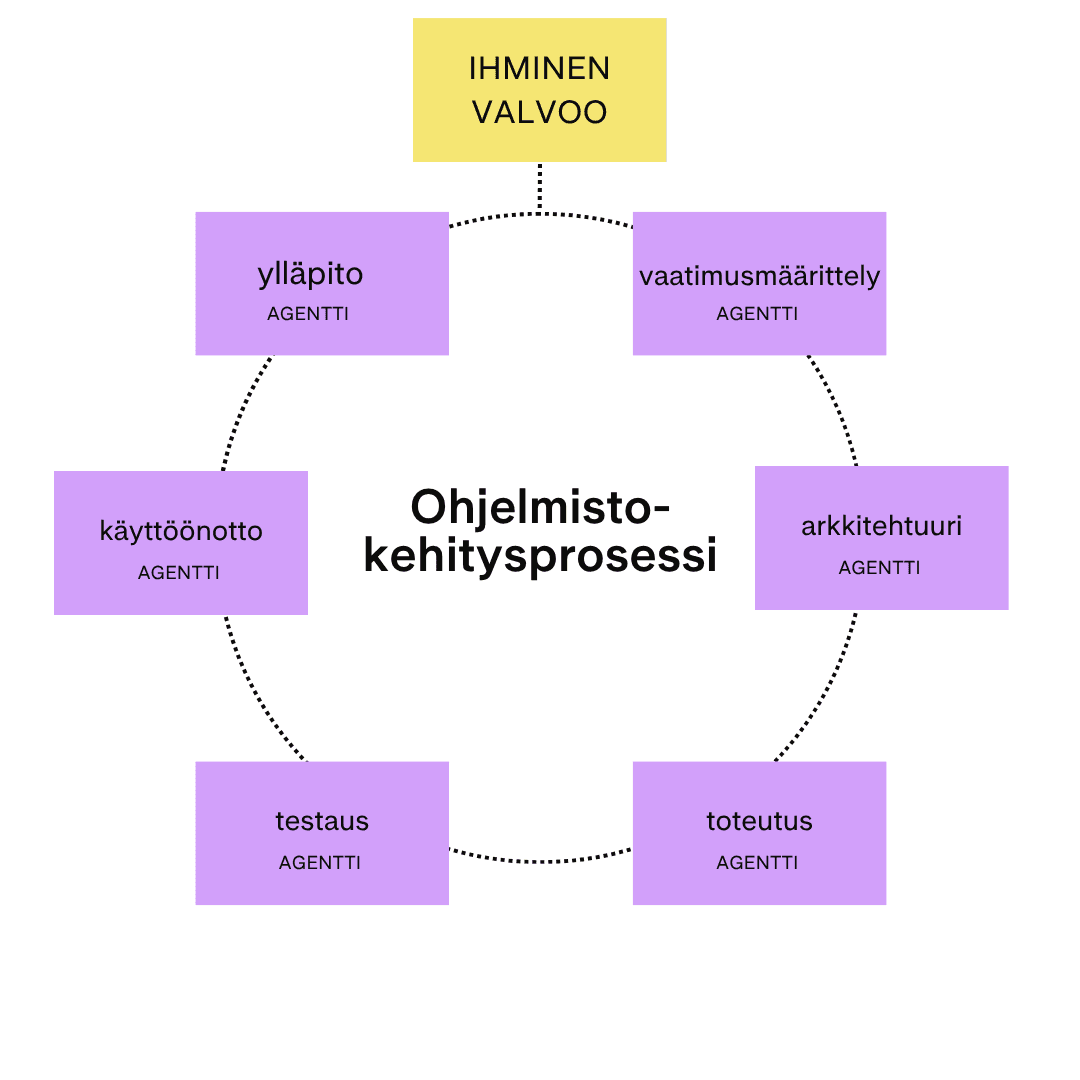
I experimented with multi-agent software development by creating a proof of concept in which the aforementioned software development phases were implemented with a multi-agent workflow. To keep the scope of the proof of concept manageable, I only implemented the first 4 phases in this example. Each phase was executed by a separate subagent, the workflow was guided by the orchestrator agent, and a human reviewed the results at defined checkpoints. I used Claude Code in this implementation, but a similar implementation could be done with other tools as well.
Orchestrator Guidelines
I started by defining how the orchestrator should operate. I did this together with Claude by describing the desired behaviour of the orchestrator, and the agent implemented it. The orchestrator's instructions were defined in the CLAUDE.md file as well as in the project's skills (.claude/skills/<name>/SKILL.md). In these places, for example, the process and checkpoints of the multi-agent workflow to be used were defined. Because design and validation are important in agentic software development, I set checkpoints for the requirements specification, architecture, and review – at these points, the orchestrator was not allowed to proceed without human approval.
In this model, when the software development process was started, a new session was opened, within which the orchestrator coordinated the workflow. It called subagents as needed, passed the necessary context to them, and compiled the results. Communication between the human and the subagents always went through the orchestrator. The human's task was to make the decisions and act as a gatekeeper.
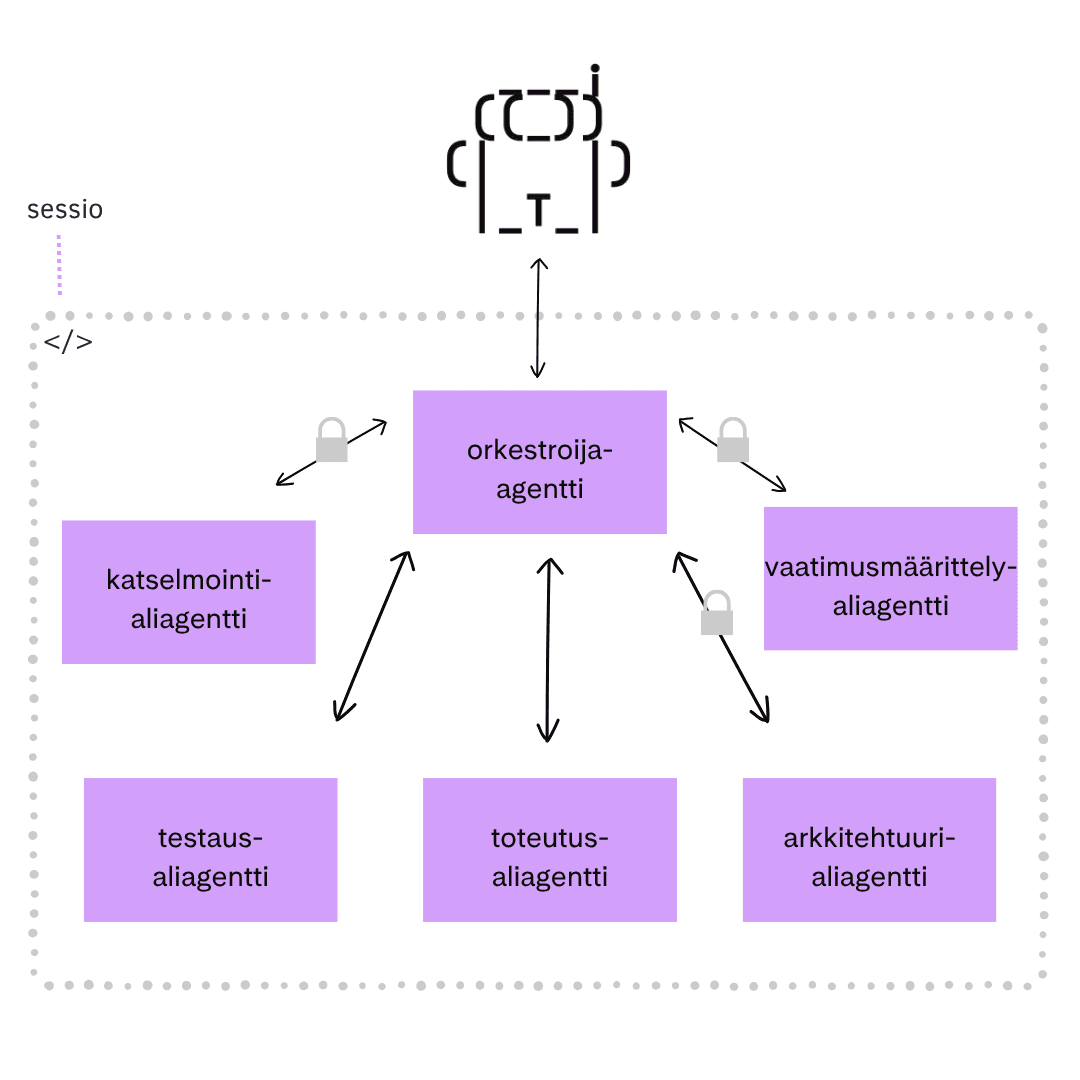
Defining Subagents
Next, the subagents were defined. This was also done in interaction with Claude in the same way as defining the orchestrator. Claude created each subagent's own configuration in the .claude/agents/ folder, where the description of the agent's role was defined.
Each subagent was defined with its own role, area of responsibility, and operating method. In addition, many other characteristics were defined for different agents, such as different language models according to the task. For example, the architecture subagent and the review subagent used a larger model than the requirements, implementation, and testing subagents.
The code block below shows part of the requirements specification subagent's definition document (.claude/agents/requirements.md). In this document, it was defined that the subagent acts as a requirements analyst and clarifies ambiguous requests, explores existing solutions, and produces a specification defining the objective, scope, acceptance criteria, and open questions. In this proof of concept, requirements were only written to files, as no ticketing system was in use.
Workflow in Practice
I tested the workflow with a fictional shopping list application that searches for recipes with similar ingredients and compiles them into a shopping list. I started by outlining the application idea for the proof of concept. This was done by starting a new session and telling the orchestrator about the application idea. We decided to start with one feature, which was recipe search. The orchestrator passed the initial idea to the requirements specification subagent, which clarified the requirements through questions together with the human (me) and produced a requirements specification document. After this, the human was able to approve or reject the proposal at the first checkpoint.
The approved requirements were passed through the orchestrator to the architecture subagent, which produced three alternative solution proposals with justifications. The plan was iterated together with the AI until the human approved it at the second checkpoint. After this, the orchestrator launched the implementation subagent.
The implementation subagent built the solution according to the plan and returned the result to the orchestrator, which next called the testing subagent. The testing subagent checked the functionality of the implementation and reported any bugs to be fixed. Finally, it produced a test report and the orchestrator transferred the work to the review subagent.
The review subagent did a code review and reported the findings. This served as the final checkpoint where the human decided whether to approve the implementation or do another round of fixes. If everything was as it should be, the cycle was complete. At this point, the human could validate the correctness of the implementation and, if necessary, start a new session for a new task or continue in the current session if the context was still okay.
SDLC Phase | Agent | Checkpoint | What happens? |
|---|---|---|---|
requirements specification | requirements specification agent | yes | asks clarifying questions and proposes a solution in a requirements specification document |
architecture | architecture agent | yes | asks clarifying questions, presents three options; the plan is iterated until the human approves it |
implementation | implementation subagent | no | codes the implementation according to the plan |
testing | testing subagent | no (except bug reporting) | tests the implementation, reports bugs to the orchestrator for fixing, and finally produces a test report |
testing | review subagent | yes | performs a code review and reports found issues; final checkpoint before ending the cycle |
Especially at the beginning, a single cycle took a long time because, for example, I didn't define functionalities well enough or validate the plans carefully, which led the development in the wrong direction. I only noticed this at the end during validation. The further away you are from the design phase, the longer it takes to fix an incorrectly specified feature.
What did I learn?
I learned during this experiment that software development has permanently changed. Previously, my tasks included design, searching for information, and also a phase I personally liked, which was coding. When coding, I have always been able to get into an almost meditative state where I can concentrate so deeply that I lose track of time. Now this phase is completely outsourced to AI, and my own task is mainly planning, pondering solutions, and validation (meaning reading, reading, and reading). I wonder how this change will affect software developers' well-being and job satisfaction during the workday in the long run?
In addition to this, I wondered how much working time multi-agent software development actually frees up. The design phases require continuous thinking even from a human, but the implementation and testing phases are ones where I feel agents can be given relatively free rein, if the agent has proven to produce sufficiently good code and the human does the validation carefully. Personally, I want the agent to ask permission for all outgoing traffic as well as, for example, installing new libraries. But what to do when the agent does tasks for a long time without needing human feedback?
If the checkpoints are configured to be strict, such free working time might not even exist. Breaks of a minute or two between agent questions are so short that switching context to another task is not worth it. Then a lot of time is wasted again when you have to return to the previous task when the agent asks a question. But if agents have more decision-making power, more working time might be freed up for humans. Then you can think about what to do with the freed-up working time. Another question is when to return to the agent if it requires attention. Do you always return immediately or, for example, after a predefined period of time.
Below are a few reflections from the trial period:
Configuring agents is a continuous process. If ready-made operating models do not exist, processes should be continuously improved and shared, for example, through version control. Organisations and teams should also develop their own processes and templates related to this. If something feels difficult, consider how it could be simplified through configuration.
Context must be managed actively. Session memory is limited, so clear scoping and separating new features into their own sessions are important.
Do token-efficient development. Several things affect this, such as the aforementioned context management. In addition, software design and configuring Claude are important, otherwise usage limits will easily be met (or you will have to invest more money in this).
Define tasks well enough. This also relates to the previous point. Agents work best when goals, boundaries, and uncertainties are clearly described. This also makes it easier to avoid hallucinations.
Think, read, and understand before you approve. AI suggestions, plans, and code should not be accepted blindly; instead, humans must understand them to avoid wasted effort and errors. This is surprisingly difficult and requires self-discipline. Validation takes more time than before because you haven't thought through and coded the features in the same way yourself.
Balance autonomy and control. Tighter guidance increases control, while greater autonomy improves efficiency but reduces visibility into the implementation.
Monitor and validate continuously. It is worth observing the agents' activities and guiding them back on track if necessary. The longer work is done in the wrong direction, the harder it is to correct the implementation to match the desired outcome.
The responsibility remains with the human! Although agents execute the work, the decisions, understanding, and final responsibility still lie with the human. What if, under schedule pressure, AI-generated code accepted quickly without a proper review produces unwanted functionality or even a critical vulnerability?
In summary, multi-agent software development speeds up software development and eliminates repetitive, tedious coding phases. However, it does not eliminate the need for planning, but emphasizes it even more. The experiment showed that a flawed requirements specification or plan easily multiplies across the entire workflow and only becomes apparent during review or validation, at which point correcting it is significantly slower.
AI tools are developing at a rapid pace, but getting real benefit from them depends on smart workflows and software engineering practices. If your team is wondering how to utilize AI effectively in software development, Saana and other Rocket Science consultants are happy to help. Get in touch and let's talk more!
The blog was originally published on Sysart's website in August 2026. The author is a full-stack software developer and DevOps expert with about 10 years of work experience in the field.